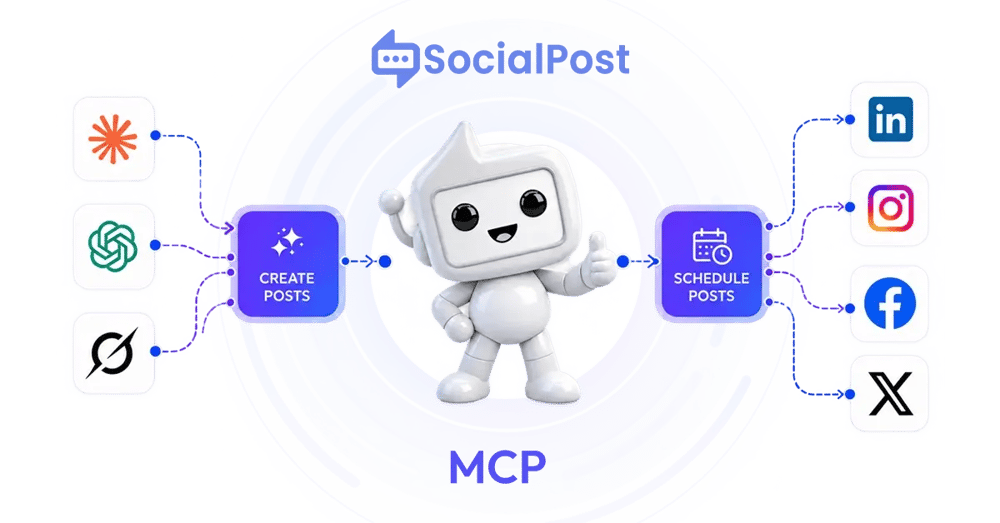
Keep your AI.
We make it look like you have a marketing team.
ChatGPT, Claude, or Grok writes the post. SocialPost renders a brand-correct visual, formats it for LinkedIn, plus X, Facebook, Instagram, YouTube and Threads, and holds it for your approval. You see the finished post before anything goes live.
Images are generated in your SocialPost account and attached to your post, so you review the finished post with its visual. Using Claude? Start with our free Claude skills for LinkedIn.
- One URL. No code, no files.
- You approve the finished post, not a line of text.
- Official platform APIs only. No automation, no pods, no auto-comments.
15,000+ founders and small businesses run their social on SocialPost.
Booking used to mean five back-and-forth emails. Now clients pick a slot in one tap, and it lands straight in your calendar. Live today for every plan.
Works inside the AI apps you already use

Grok

Start with a prompt
Paste these into your AI the moment you connect
Real prompts that work on day one. Copy one, drop it into your AI assistant, review the drafts, and approve.
What it does
Run your LinkedIn posting by asking
Connect once and these tools show up in your AI assistant. Ask in plain language, review, and approve.
See your workspace
Your plan, team, connected accounts, and this month's usage.
Check your calendar and history
What's queued, what went out, and what failed.
Save drafts together
Draft with your AI, with different text per network.
Write in your brand voice
Generate posts in your voice and tone, or from a link you paste.
Polish your own words
Keep your text, just add hashtags and emojis.
Schedule across networks
X, LinkedIn, Facebook, Instagram, YouTube, and Threads, in your timezone. TikTok coming soon.
Create a branded image
Your logo and brand colors over an AI background, attached to your post and published with it.
Put the image on your post
The generated visual, or a hosted image, attaches to the post and publishes with it. Up to 4 images.
Preview per network
See exactly what each network will get, then publish on your say-so.
Still done in the web app
A few things stay in the SocialPost.ai web app for now:
- Connecting or removing social accounts
- Uploading a photo from your device
- Editing a saved post (ask for a fresh draft instead)
- Recurring schedules
- Analytics and performance numbers
- Carousels and video posts
You stay in control
Your AI drafts. You approve the finished post.
- ✓ Nothing publishes without your approval Every post waits for your explicit go-ahead in the chat before it goes anywhere.
- ✓ A 10-minute safety window Scheduled posts are set at least 10 minutes out, so there is always time to cancel.
- ✓ Disconnect in one step Remove the connector in your AI app and access ends at once. No lingering permissions.
Post to LinkedIn?
Your AI has prepared a post and is waiting. It will not publish until you approve it here.
Official platform APIs only. No scraping, no engagement automation, nothing that puts your account at risk.
How we compare
Keep your AI. Get a marketing team's output.
Taplio is the comparison most of our buyers make. Here's the honest, side-by-side version.

Taplio details reflect their public pages (taplio.com) as of September 2026.
Set it up
Connect in about two minutes
Paste one URL into your AI app, sign in, and approve. The steps below are for Claude. In ChatGPT or Grok, add the same URL as a custom connector in that app's settings.
- 1 Paste one URL into your AI app. In claude.ai, open Settings, choose Connectors, and paste the SocialPost.ai connector URL. Then sign in to SocialPost to link it to your account. Four clicks, about two minutes, no code and no files.
- 2 Ask for a post. "Write a LinkedIn post about why we stopped doing discovery calls, and schedule it Tuesday 9am." Your AI writes the words. SocialPost.ai formats them for LinkedIn and builds the visual.
- 3 Approve it and get back to work. The post waits in your chat until you say yes, then publishes on schedule. Cancel any time before it goes out.
Connector URL (the same for everyone)
https://api.socialpostai.com/api/mcp/
The URL is public. Signing in with your SocialPost account is what ties it to you, so only you can approve and publish. Claude's free plan includes one custom connector; some other AI apps require a paid plan.
FAQ
Questions before you connect
Why not just use my AI's built-in posting?
Because there is no built-in posting. Claude, ChatGPT, and Gemini write the words and stop there. You still copy the text out, fix the line breaks LinkedIn eats, find or make an image, size it for each network, and remember to hit post at 9am. SocialPost.ai picks the text up where your AI puts it down.
The copy-paste tax. A founder posting three times a week spends more time moving text between windows than writing it.
The visual. Your AI cannot make a post that looks like your brand. That is the difference between a founder posting and a company posting.
The record. A queue, a calendar, what went out, what failed. Your chat history is not a publishing schedule.
How is this different from Taplio's MCP?
Taplio confirms text in chat. SocialPost shows you the finished, branded post and holds it until you approve. We do not automate comments, connections or DMs.
Do I need a paid plan to use the SocialPost.ai MCP?
No. It works on the Free plan, no card required. And on Claude, even the free plan now includes one custom connector, so the whole thing can run without paying anyone. Some other AI apps still require a paid plan for custom connectors.
What does Free include?
100 text posts a month, no card. Founder $49 ($39 annual) and Team $149 ($119 annual) add more, with fair-use ceilings of 500 and 1,500 posts and 10 and 40 web-research runs.
Can it create images for my posts?
Yes. Ask for a branded image and you get your real logo and brand colors over an AI background, attached to your post and published with it. Set up your brand once in the web app first; without one you get a plain AI image and the result tells you so.
Is my account safe?
Yes. SocialPost.ai uses official platform APIs only, with no scraping and no engagement automation. Nothing publishes without your approval, scheduled posts are set at least 10 minutes out so you can cancel, and you can disconnect in one step.
Can the AI post something without me seeing it?
No. Nothing publishes without your explicit approval in the chat, and scheduled posts are set at least 10 minutes out so you can always cancel first.
How do I disconnect?
Remove the connector in your AI app. Access ends at once.
Keep your AI. Let SocialPost do the posting.
Connect SocialPost.ai to your assistant and publish by asking. Works on the Free plan, and you approve everything.
Free forever, no card. Founder is $49 a month, or $39 a month billed annually.